%20(1).png)

Remote Support for Event Businesses: What You Can Actually Hand Off Before Peak Season

Updated: Aug 20

There's a specific window every event business misses. It's the eight to ten weeks before peak season, when things are still calm enough to set up help but urgent enough that you should. Most owners blow past it, tell themselves they'll "figure it out when it gets busy," and then spend peak season doing $15-an-hour admin at midnight because there was never a moment to onboard anyone.
Remote support for event businesses solves a very specific version of this problem: it lets you offload the operational and administrative load without hiring an on-site employee, without office space, and without the long ramp of a traditional hire. But it only works if you set it up before the wave hits, and if you're clear about what actually can and can't be handed off.
This is a practical inventory of exactly that. What you can delegate to remote support, what you should keep, and how to sequence the handoff so you walk into peak season with margin instead of panic.
Key Takeaways
The best window to set up remote support for event businesses is eight to ten weeks before peak season, while there's still time to onboard without the pressure of live events.
Nearly the entire administrative and operational spine can be handed off: inquiry response, CRM management, proposal formatting, scheduling, invoicing, vendor confirmations, and post-event follow-up.
What you should keep: creative direction, high-stakes client relationships, final pricing decisions, and on-the-day judgment calls.
The handoff should be sequenced, not dumped. Start with documented, repeatable tasks and expand as trust builds.
The payoff isn't just saved hours. It's protected response time and booking rate during the season when they matter most.
Why Peak Season Is the Real Deadline
Event work isn't evenly distributed. For most event businesses, a concentrated stretch of the year carries the large majority of the annual workload, and the U.S. Bureau of Labor Statistics notes that event planners routinely work long, irregular hours to meet deadlines and manage events as they happen. That seasonality is exactly why the timing of setting up support matters so much.
Here's the trap. During the off-season, you don't feel the pain, so you don't set up help. During peak season, you feel the pain acutely, but you have no time to onboard anyone, because onboarding requires the very hours you no longer have. The result is that the moment you most need remote support is the worst possible moment to start looking for it.
The fix is to treat the pre-season window as a hard deadline. Setting up remote support eight to ten weeks out gives you time to document workflows, onboard the person, work through the inevitable early misfires, and hit peak season with a support system that's already running.
What "Remote Support for Event Businesses" Actually Means
Remote support, in this context, usually means a trained virtual assistant (or a team of them) handling your operational and administrative work remotely, rather than an on-site coordinator or a full-time employee. If you're weighing which of those roles you actually need, our event coordinator vs event virtual assistant comparison works through that decision in detail.
The defining feature is that the work happens off-site and asynchronously. That's a strength for the administrative spine of an event business (inquiries, CRM, scheduling, follow-up all happen remotely and on flexible hours) and a limitation for anything requiring physical presence on the event floor. Knowing which side of that line each task falls on is the whole game.
The Handoff Inventory: What You Can Actually Delegate
Here's the practical part. Organized by category, this is what event businesses most commonly and successfully hand off to remote support.
Inquiry and Lead Management
Monitoring and responding to inquiries across channels (website forms, email, social DMs)
Fast first-response with your pricing guide or intake questionnaire
Lead triage and tagging in your CRM
Following up with leads who haven't responded
Scheduling consult calls
This is usually the highest-impact category to hand off first, because response time is one of the strongest predictors of booking rate, and it's the thing that slips most during peak season.
CRM and Proposal Management
Setting up and maintaining your CRM (HoneyBook, Dubsado, Aisle Planner, and similar)
Building and customizing tiered proposal templates
Sending and tracking proposals
Configuring payment schedules tied to event dates
Keeping the pipeline clean and current
If you're still choosing a platform, our CRM comparison for event planners covers which tools remote support should be fluent in.
Scheduling and Calendar
Managing your calendar and booking consults
Coordinating vendor calls and site visits
Sending reminders and confirmations
Preventing double-bookings across concurrent events
Vendor Coordination (the Remote Parts)
Sending and tracking vendor confirmations
Chasing down outstanding confirmations before the event
Maintaining vendor contact lists and preferred-vendor databases
Routing contracts and paperwork
Note the qualifier: the remote parts. On-site vendor management during the event is coordinator work, not remote support. The confirmations, paperwork, and pre-event chasing, though, are exactly what a remote VA should own.
Invoicing and Payment Follow-Up
Sending invoices and deposit requests
Following up on overdue payments
Tracking payment schedules against event dates
Basic bookkeeping handoff to your accountant
Post-Event Workflow
Sending thank-you sequences
Requesting reviews (the single most valuable lead-gen asset for event pros, and the one most often forgotten)
Referral follow-up
Archiving and closing out projects in the CRM
Content and Admin Support
Social media scheduling and light content support
Inbox and email management
Document organization
Basic reporting
Across these seven categories, most event businesses find that the majority of what consumes their week is delegatable. The instinct that "no one else can do this" is usually true for a small slice of the work and false for the rest.
What You Should Not Hand Off
This is the honest part, and it matters as much as the inventory above. Remote support is not a substitute for the things that only you can do.
Creative direction and design. The vision, the aesthetic, the thing clients actually hire you for. This is your differentiator. Don't delegate it.
High-stakes client relationships. The emotional, trust-building conversations, especially for weddings and milestone events, benefit from your direct involvement. A VA can handle logistics and coordination around these relationships, but the relationship itself is often yours to hold.
Final pricing and business decisions. A VA can build the proposal and send it. The decision about what to charge and which projects to take is a business-owner call.
On-the-day judgment. Live event execution and the hundreds of real-time decisions on event day are coordinator or owner territory, not remote support.
A quality remote support provider will tell you this too. If someone is promising to take everything off your plate, including the work that defines your business, that's a reason for skepticism, not relief.
How to Sequence the Handoff
Handing off well is a process, not a data dump. The businesses that get the most from remote support follow roughly this sequence in the weeks before peak season.
Weeks 8 to 10 out: Document and identify. List every recurring task in a typical peak week. Sort into hand off, keep, and eliminate. (You'll find some tasks are just habit and can be dropped entirely.) Document the repeatable ones, even roughly. A Loom video walking through your CRM is worth more than a written manual.
Weeks 6 to 8 out: Start with the clearest tasks. Hand off the most documented, most repeatable work first: inquiry response templates, proposal formatting, confirmation sequences. These have clear right answers, so they're the fastest to onboard and the easiest to check.
Weeks 4 to 6 out: Expand as trust builds. As the early tasks prove out, add the ones requiring more judgment: lead triage, follow-up sequencing, light vendor coordination. This is also when you refine the workflows based on what you learned in the first pass.
Weeks 2 to 4 out: Run a live rehearsal. Route real inquiries and real workflows through your support before the wave. The misfires you catch now are the ones that would otherwise blow up mid-season.
Peak season: Support runs, you focus. By the time volume triples, the system is already tested and running. You spend the season on creative direction and client relationships, not midnight admin.
If any of this feels familiar because you're already past the calm window and into the overwhelm, our article on event planner burnout covers the recovery side of the same problem.
Case Study: DJ Will Gill
DJ Will Gill runs a high-volume wedding and corporate entertainment business, and his story is a clean example of what handing off the operational spine can unlock. Inquiries were healthy. The constraint was bandwidth: responding to every lead, customizing proposals, following up on holds, and tracking deposits across dozens of events simultaneously, all while performing and running the business.
The work that got handed off to YSO's remote support was exactly the delegatable inventory above: inquiry triage, proposal customization inside HoneyBook, and follow-up sequences on holds that hadn't converted. Every inquiry got a same-day response. Every hold got a follow-up before it went cold. The administrative spine that had been personally shouldered became a system someone else ran.
Per YSO's documented case study, the business grew 57%, and DJ Will Gill was recognized on the Forbes Next 1000 list. The point isn't that remote support alone produced that growth. It's that the growth was possible because the owner's time was freed from the operational load to focus on the performance, the brand, and the client relationships that actually drive a high-end entertainment business.
Full details are on our case studies page.
Frequently Asked Questions
What is remote support for event businesses?
Remote support means a trained virtual assistant or team handling your operational and administrative work off-site: inquiry response, CRM management, proposals, scheduling, invoicing, vendor confirmations, and follow-up. It's distinct from an on-site coordinator, who handles live event-day execution.
What can I hand off to remote support before peak season?
Nearly the entire administrative spine: inquiry and lead management, CRM and proposal work, scheduling, the remote parts of vendor coordination, invoicing and payment follow-up, post-event workflows, and content and admin support. What you should keep is creative direction, high-stakes client relationships, final pricing decisions, and on-the-day judgment.
When should I set up remote support?
Ideally eight to ten weeks before peak season. That window gives you time to document workflows, onboard, work through early misfires, and hit the busy stretch with a system that's already running. Setting up support mid-season is much harder because onboarding requires hours you no longer have once events are live.
How is remote support different from hiring an employee?
Remote support is typically more flexible on hours and volume, doesn't require office space or on-site presence, and can often be scaled up for peak season and down in the off-season. Whether a contractor or employee arrangement is right for you also has legal and tax implications worth reviewing with the U.S. Small Business Administration's hiring guidance.
Will a remote assistant know my CRM and tools?
A trained event VA should already be fluent in the major event CRMs (HoneyBook, Dubsado, Aisle Planner, and similar) or able to ramp quickly. When vetting, confirm this directly. Our guide on what makes a great event VA covers how to test for CRM fluency and the other traits that matter.
About Your Startup Operations
Your Startup Operations (YSO) is a Women-Owned Small Business (WOSB) certified, white-glove operations agency co-founded by Jenna Henao and Alexis Schomer. YSO helps event business owners and other service-based companies step out of daily operations by installing a dedicated Ops Assistant trained specifically for their business, typically helping owners reclaim 30–40 hours per week.
YSO has been featured in Forbes, Voyage LA, Authority Maximizer, EIN Presswire, and AP News.
Explore our event vendor ops services, see client outcomes on our case studies page, or get in touch to talk through what your business needs.
About the Author

Jenna Henao is the Co-Founder and Operations Expert at Your Startup Operations. She works with business owners to strengthen operations, optimize workflows, and build reliable teams that support long-term business growth. With experience in entrepreneurship and operations leadership, Jenna has overseen initiatives across HR, finance, recruitment, operations, sales, marketing, and team development. She has helped businesses scale from six figures to seven figures by building efficient systems, recruiting top talent, and implementing processes that create a solid foundation for lasting success. Connect with Jenna on LinkedIn.
Reviewed by

Alexis Schomer is the Co-Founder and Marketing & Operations Expert at Your Startup Operations. She partners with business owners to streamline operations, improve delegation, and develop scalable systems that support sustainable growth. With a background in marketing, entrepreneurship, and business operations, Alexis knows that effective delegation goes beyond hiring a virtual assistant. It involves selecting the right person, creating efficient workflows, establishing clear expectations, and providing the training and support teams need to thrive. This practical, systems-focused approach guides every client partnership at YSO. Connect with Alexis on LinkedIn.
Free Resources
Access free tools, templates, and SOPs that help you streamline your operations, delegate more effectively, and build systems that support sustainable business growth.

25 Tasks You Can Offload to Your VA Today
Your schedule can quickly fill up with emails, follow-ups, scheduling, and other administrative work. This guide highlights 25 tasks you can confidently delegate to a virtual assistant, giving you more time to focus on growing your business instead of managing the day-to-day.
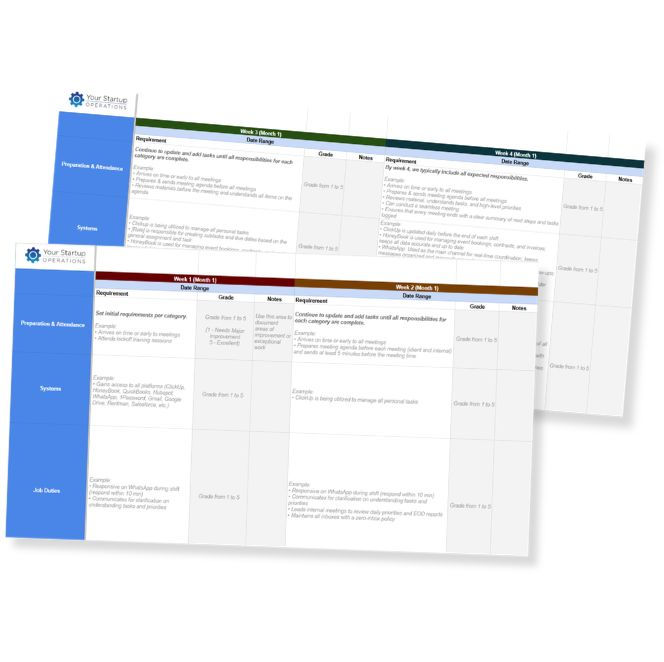
90-Day Onboarding
Template
A strong onboarding process helps new hires become productive without adding unnecessary work to your plate. Use this template to establish clear expectations, define responsibilities, and track performance during the first 90 days with confidence.

Best Practices for Creating an SOP
When important processes aren't documented, your team has to rely on you for answers. This guide walks you through creating clear, repeatable SOPs that make delegation easier, improve consistency, and help work move forward with less oversight.


