%20(1).png)

Building a Scalable Backend with a Virtual Assistant for Event Business Operations

Updated: Jun 17

Most event businesses don't fail because the work is bad. They stall because the systems behind the work can't scale.
You can run 15 events a year on spreadsheets, a personal inbox, and tribal knowledge in the founder's head. You cannot run 50 the same way. Somewhere between event 20 and event 30, the cracks show up: double-booked vendors, late invoices, missed RSVPs, and follow-ups that never went out. The work hasn't gotten harder. The infrastructure has run out of runway.
This is where a virtual assistant for event business operations earns the role title. The job isn't to do more tasks. The job is to build and operate a backend that can absorb more events without absorbing more founder hours. That's a systems build, not a task list.
This guide walks through the five-layer backend that scales for event businesses, the 30/60/90-day sequence to build it, and the tooling decisions that hold up past 100+ events a year. Written for founders past Stage 1 (roughly $250K+ in revenue), but the framework applies earlier if you're growing fast.
Key Takeaways
A scalable event business backend has five layers: SOP library, CRM and client lifecycle, vendor and production hub, communication architecture, and reporting. Skip a layer, and the others break.
The right virtual assistant for event business operations doesn't just execute work; they design, document, and operate the systems that hold the work together.
Build in phases: documentation in days 1–30, CRM and production hub in days 31–60, communication and reporting in days 61–90.
According to the Professional Convention Management Association, CRM and automation capabilities drive measurable operational benefits, including faster lead conversion and improved client satisfaction.
The single biggest failure mode is treating the VA as a task-doer instead of a systems operator. The first 90 days are about building infrastructure, not just clearing inboxes.
What a Scalable Backend Actually Looks Like
Before walking through the layers, here's the principle that holds them together.
A backend is scalable when adding 10 more events a year doesn't require adding 10 more hours a week from the founder. That sounds obvious until you map your current operations against it. Most event businesses operate with linear systems; every new event creates the same amount of new founder work. The whole point of a backend is to break that linearity.
Three things make a backend scale:
Documentation: Anyone trained on the system can execute it without the founder explaining
Centralization: One source of truth per workflow (one CRM, one project board, one communication channel)
Cadence: Defined rhythms for review, reporting, and improvement, not ad hoc
Every layer below serves one or more of these. Miss them, and you're not building a backend; you're just hiring a helper.
Layer 1: The SOP Library (Documentation Foundation)
This is layer one because nothing else works without it.
A Standard Operating Procedure (SOP) is the written or recorded version of how a recurring task gets done, including client onboarding, vendor outreach, RSVP collection, timeline drafting, and post-event follow-up. The SOP library is the collection of all of them in a single, searchable, version-controlled location.
What your VA owns at this layer
Building the initial SOP library from your existing tribal knowledge (typically 15–25 SOPs by day 30)
Recording video walkthroughs in Loom alongside written checklists
Versioning and updating SOPs as your business evolves
Onboarding any future hires (your second VA, an assistant coordinator, a junior planner) using the library
How to build it
Start with the five tasks you do most often. For an event business, that's almost always: client inquiry response, contract send, vendor outreach, RSVP tracking, and post-event follow-up. Record yourself doing each task once. Talk through your decisions out loud. Your VA converts the recording into a written SOP within 48 hours.
By day 30, you should have a documented version of every recurring workflow in your business. By day 90, the library should cover 80% of weekly operations.
"I didn't realize the true value of outsourcing... We were contracted for about 20 to 30 hours per week, and I would say we got back probably 2 to 3x that. The systems, the SOPs, the software setup, that piece alone catapulted us into where we needed to go to reach our growth goals. Also, every single time a question came up, YSO met it, exceeded it, and if something wasn't working, they fixed it immediately.You're wasting time by not making the decision. I probably would have saved myself a couple of months if I'd moved forward sooner." - Valerie, General Manager & VP of Sales, b.box for Kids USA
Layer 2: CRM and Client Lifecycle (Deal Management Core)
The CRM is where every lead, client, and contract lives. Without it, your backend doesn't have a memory.
Event planning requires simultaneous coordination across clients, vendors, venues, sponsors, and attendees, each with different communication needs and timelines. A CRM purpose-built for event work is the only sustainable way to manage that complexity past 30 events a year.
What your VA owns at this layer
Logging every inquiry the day it comes in
Tagging by source (referral, Instagram, Google, vendor partner, etc.)
Moving leads through pipeline stages (Inquiry → Proposal Sent → Contract Sent → Booked → Event Delivered → Follow-Up Complete)
Triggering automated nurture sequences at each stage
Flagging stalled deals at 7, 14, and 30 days
Reconciling CRM data against booked calendar and invoice records monthly
Choosing the platform
For most event businesses, the right CRM is one of three:
Honeybook: Best for solo planners, florists, photographers; strong proposal-to-contract-to-invoice flow
Dubsado: Best for vendors who need deeper workflow automation and forms
17hats: Best for wedding-heavy vendors wanting an all-in-one approach
Planning Pod: Best for venues and multi-event production businesses needing room/inventory management
The choice matters less than the commitment. CRMs automate routine workflows, including lead follow-ups, contract reminders, payment tracking, and vendor confirmations, freeing capacity for high-value strategic work such as venue negotiations, client consultations, and creative event design.
The single most underused CRM play
Set up post-event sequences: a thank-you email at +3 days, a review request at +7 days, a referral ask at +30 days, and a "we miss you" check-in at +12 months. Most event vendors write these once and never automate them. Your VA can build them once and run them for every event going forward, which compounds into significant revenue from repeat clients and referrals you'd otherwise miss.
You can browse the full recommended stack on the YSO Tools & Software page.
Layer 3: Vendor and Production Hub (Project Layer)
Once a client is booked, the work shifts from sales to production. This is where the project layer takes over and where most event businesses are weakest.
What your VA owns at this layer
Creating a project for every booked event in Asana, ClickUp, or Notion
Mapping a standard event timeline (T-90 days, T-60, T-30, T-14, T-7, T-1, event day, T+1, T+7, T+30)
Owning vendor outreach, confirmation, and document collection
Maintaining a shared timeline document that both the client and your team can see
Centralizing all vendor communication into one queue (shared inbox or per-vendor channel)
Flagging risks to you before they become crises
The structure that scales
Build one project template per event type: wedding, corporate, fundraiser, private celebration. Every new booking spawns a copy of the template with all standard tasks, dates, and dependencies pre-loaded. Your VA fills in the client-specific details. By week 4 of any engagement, you should never be creating a new event project from scratch.
This is also the layer where avoiding unnecessary complexity matters most. Small businesses often adopt multiple tools in an attempt to improve efficiency, but this creates fragmentation. One project management tool. One source of truth. Resist the temptation to spin up a fresh Trello board "just for this client" every time.
Layer 4: Communication Architecture (How Information Flows)
Most event businesses don't have a communication problem; they have an architecture problem. Information lives in too many channels, none of them designated for a specific purpose.
What your VA owns at this layer
Defining and enforcing channel-purpose pairs (where does each type of conversation belong?)
Running the recurring sync cadence (Monday planning, Friday handoff, monthly review)
Maintaining a shared dashboard, founders can check in 60 seconds for "what's happening this week."
Acting as the inbox gatekeeper for the founder
The channel architecture that holds up
A clean architecture has one channel per purpose, no overlap:
Email: External client and vendor correspondence
Slack or Voxer: Internal team chat (you ↔ VA, you ↔ contractors)
CRM messaging: Automated client communications
Loom: Async explainers, training, and decision walkthroughs
Project management comments: Task-specific discussion that lives with the work
If a conversation could happen in two of those, you've already lost. Your VA should be the one drawing the lines and re-routing conversations that drift into the wrong channel.
The cadence that prevents fire drills
Monday 30-minute planning sync: Review every active event, hand off new work, unblock stuck items
Mid-week async check-in: Short written update from VA, no meeting required
Friday 30-minute handoff: Weekend coverage plan and weekly close-out
Monthly 60-minute review: What worked, what didn't, what changes next month
For more on this rhythm in practice, see our productivity hacks for event planners working with a virtual assistant, and if marketing is one of the channels in the architecture, our breakdown of marketing tasks your VA should own covers what runs where.
Layer 5: Reporting and Continuous Improvement (The Feedback Loop)
This is the layer most event businesses never build, and it's the one that separates a backend that scales from one that just survives.
Without reporting, you don't know what's working. You're flying on instinct, which works until it doesn't.
What your VA owns at this layer
A weekly snapshot: inquiries received, proposals sent, bookings closed, revenue logged
A monthly dashboard: lead sources, conversion rates, marketing-attributed bookings, average deal value
A quarterly review document comparing this quarter to last
A running list of process improvements identified during operations
The "what should we automate next?" question is asked monthly
The metrics that actually matter for event businesses
Inquiry-to-booking conversion rate: The single most important sales metric
Average response time: To new inquiries (sub-4 hours is the operational target)
Lead source attribution: Where bookings actually come from, not where you think they come from
Average deal value: Trending up, flat, or down?
Repeat and referral percentage: Your real measure of brand strength
VA hour utilization: What percentage of your VA's hours are going to strategic vs. reactive work?
The 30% gain hiding in plain sight
AI-assisted workflows can improve execution speed, especially in decision-heavy processes. Gartner has reported similar productivity gains across AI-enabled functions, including a projected 30% faster financial close for finance teams using embedded AI assistants and 25–30% productivity gains for teams applying AI across the software development life cycle.
Most event businesses haven't even hit the basic workflow automation tier yet, much less the AI-assisted layer. The fastest gains come from automating the most repetitive 20% of your VA's work, freeing them to operate higher in the value stack.
The 30/60/90-Day Build Sequence
Don't try to stand up all five layers at once. The pattern that works:
Days 1–30: Documentation and Foundation
Audit existing operations (what tools, what workflows, what's broken)
Record and document the top 15 SOPs
Choose and consolidate into one CRM
Set up basic communication architecture (channel-purpose pairs, Monday/Friday sync)
VA absorbs inbox triage and immediate scheduling
By day 30, you should feel real inbox relief, and your VA should know your business well enough to start operating semi-independently.
Days 31–60: CRM and Production Hub
Migrate all active and recent clients into the CRM
Build pipeline stages and automated nurture sequences
Create project templates for each event type
Centralize vendor communication into one queue
VA owns the full client lifecycle and event production
By day 60, you should be able to take a week off without any operations breaking.
Days 61–90: Reporting and Optimization
Build the weekly and monthly reporting dashboards
Run the first end-to-end review (what worked, what didn't)
Identify the next 20% of automation opportunities
Document the operating system itself, how the backend is designed, and why
VA shifts from execution to operational partnership
By day 90, you should have a backend that runs without you in the daily details and the documentation to onboard the next person whenever you're ready.
The detailed week-by-week walkthrough is covered in our 90-day virtual assistant onboarding process, which pairs with this system's guide.
The Backend Toolset (At a Glance)
Layer | Primary tools | What it powers |
SOP Library | Notion, Loom, Google Docs | Documentation, training, and version control |
CRM | Client lifecycle, pipeline, automation | |
Production Hub | Asana, ClickUp, Notion | Event projects, vendor coordination, timelines |
Communication | Slack, Voxer, Loom, Email | Channel discipline, async updates |
Reporting | Google Sheets, Notion dashboards, native CRM reporting | Weekly snapshot, monthly review, decision data |
The lighter the stack, the better. Businesses that implement clear workflows and documentation tend to experience improved efficiency and consistency, but adding too many tools creates fragmentation that defeats the purpose.
Common Pitfalls When Hiring a Virtual Assistant for Event Business Operations
Three patterns derail most event business backend builds.
Pitfall 1: Building everything at once. Founders who try to stand up the SOP library, CRM, project hub, communication architecture, and reporting in week one all burn out by week three. The 30/60/90 sequence exists for a reason. Layer one supports layer two; skip the foundation, and the higher layers collapse.
Pitfall 2: Treating the VA as a task-doer instead of a systems operator. If you only ever ask your VA to "do this thing, then that thing," you're getting a fraction of the value. The right virtual assistant for event business operations should be designing and improving systems, not just executing them. That requires explicit scope; your VA needs to know that "make this better" is part of the job.
"In less than four months, I saw a 12x return on what I invested with YSO. There were deals I straight up wouldn't have won without my VA because I just didn't have the bandwidth. The quality is exceptional, the processes are tried and tested, and I never looked back. If working with YSO doesn't work for you, I don't think hiring a VA would work for you at all." - John, Founder and President of Simply Branded
Pitfall 3: Skipping reporting because "I already know what's happening." No, you don't. Every event business owner I've worked with has been wrong about their actual conversion rate, real top lead source, or true average deal value the first time we ran the numbers. CRM and automation capabilities drive faster lead conversion and improved client satisfaction, but only if you actually use the reporting outputs to make decisions. Reporting without action is just paperwork.
For the warning signs that your current setup is breaking, see 7 signs your business needs virtual and in-person event support right now. For the warning signs you've outgrown your first system, see why most event businesses outgrow their first virtual assistant.
Frequently Asked Questions
How many hours per week does it take to build the backend with a VA?
For a Stage 2 event business (roughly $250K–$750K revenue), expect 20–30 hours per week of VA time during the first 90 days. After the build is complete, sustaining operations typically require 20–40 hours per week, depending on event volume. The build phase is heavier; the run phase is lighter.
Can I build this with a part-time freelance VA?
You can start it, but most event businesses past Stage 1 outgrow part-time freelance support during the build phase. A managed Event Assistant trained, supervised, and backed by an agency typically completes a full backend build in 90 days. A freelancer working 10 hours per week usually takes 6+ months and may not get past Layer 2.
What if I already have systems, but they're fragmented?
Start with a backend audit. Document what tools you have, what each one is supposed to do, and where the duplication and gaps are. Most fragmented setups need consolidation, not new tools. Your VA can run the audit in week one and present a recommended consolidation plan.
Do I need to migrate everything to the new tools?
Usually no. The right answer is to use the strongest tool you already have for each layer and add only what's missing. Most event businesses already have a CRM and project management tool, but they just aren't using either to its full capability. Optimization beats replacement nine times out of ten.
Who owns the backend if my VA leaves?
This is the central reason documentation is layer one. A well-built backend doesn't depend on any single VA. The SOP library, CRM, and project hub all persist regardless of who is operating them. A new Event Assistant onboarded into a documented backend can be productive in week two, not month two. This is also why we recommend the agency model in our analysis of why hiring through an operations agency gets you a better virtual assistant. Agency-trained VAs come in already understanding scalable backend patterns.
How is this different from just hiring a coordinator?
A coordinator executes the work in front of them. A backend operator designs the system that the coordinator runs inside. Different jobs, different skill sets. Past 30 events a year, you'll likely need both, but you need the backend operator first, because the coordinator will burn out without the systems.
When should I start building the backend?
The honest answer is yesterday. The second-best answer is now. The structural cost of operating without a backend compounds with every event you book. Waiting until you "have time to focus on it" guarantees you'll never have time.
Ready to Build the Backend?
If you've read this far and the framework makes sense, the next step is to turn it into an actual build for your business.
YSO matches event vendors with managed Event Assistants who design, document, and operate the full five-layer backend, not just execute tasks. Every engagement is built around the 30/60/90 sequence above, with the agency handling recruiting, training, SOP creation, and ongoing supervision so the system build doesn't sit on your plate.
Book a free discovery call, 30 minutes, no pressure. You'll leave with a backend audit of your current setup and a recommended build path, whether or not you sign with us.
Author Bio

Jenna Henao, Co-Founder and Operations Expert at Your Startup Operations, helps founders turn messy operations into clear systems, stronger workflows, and teams that know how to execute. Her experience across HR, finance, operations, recruitment, management, sales, and marketing has helped multiple startups build the structure needed to grow from six figures to seven figures.
Reviewer Bio

Alexis Schomer, Co-Founder and Marketing and Operations Expert at Your Startup Operations, helps founders step out of the daily details by improving efficiency, strengthening delegation, and building the right operational support around them.
About Your Startup Operations
Your Startup Operations is a Women-Owned Small Business certified operations and virtual assistant agency co-founded by Jenna Henao and Alexis Schomer. The agency helps small business owners take work off their plate with trained, fully managed support across events, admin, and bookkeeping. Featured in Forbes, Voyage LA, Authority Maximizer, and AP News.
Free Resources
Practical tools, templates, and SOPs to help you offload day-to-day operations and build a business that runs more smoothly.

VA
Interview
Questions
Hiring the right VA is easier when you know what to ask. This guide gives you practical interview questions to help you spot strong communication, real ownership, and the skills your business actually needs.
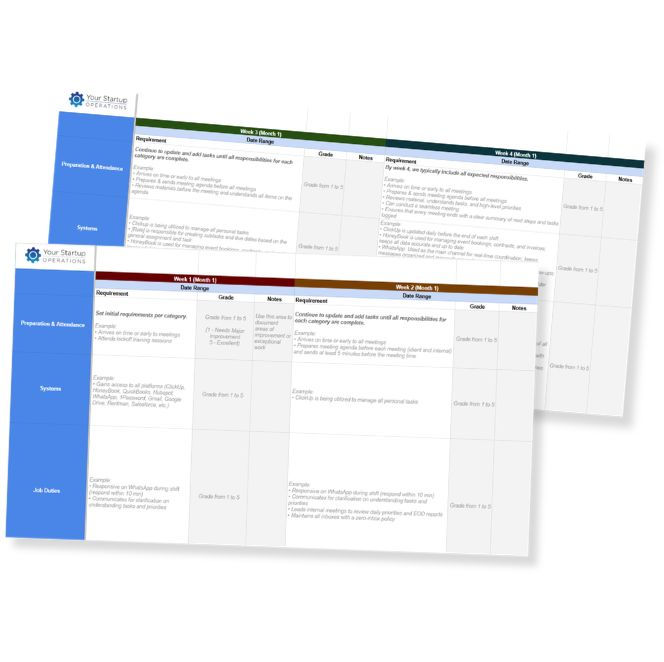
90-Day
Onboarding
Template
Set your new hire up to succeed from the start.
This template helps you clarify expectations, assign ownership, and measure progress throughout
the first
90 days.

How to Send a Certificate of Insurance
A COI should be easy to send, but small mistakes can slow everything down. This SOP gives you a clear step-by-step process to help prevent rejections, reduce back-and-forth, and keep approvals moving.


